The Binary Search Tree (BST)
Get a better understanding of the binary search tree (BST), with practical examples.

Before defining what a tree is, let’s explore the motivation behind why and when you should use it. For linear data structures such as Arrays of size $n$ and linked lists of size $n$, we have problems, namely in the time complexities when we want to perform operations:
For an array or a linked list of size $n$:
- An insertion is $O(1)$
- Searching is $O(n)$
- Deletion is $O(n)$
For a sorted array of size $n$:
- Searching is $O(\log n)$
- An insertion is $O(n)$
- Deletion is $O(n)$
On the other hand, as we will see, Trees (that are balanced) will neatly combine the advantages of both data structures.
What is a Tree?
A tree is a data structure that consists of nodes and edges with hierarchical relationships (parent-child). Each node consists of stored data, and of pointers to the children of that node.
Properties of a tree:
- It has a hierarchical structure.
- Each node $n$ except the root has a single parent.
- Each node stores a value.
- A leaf is a node without any children.
- Nodes are connected by edges (lines).
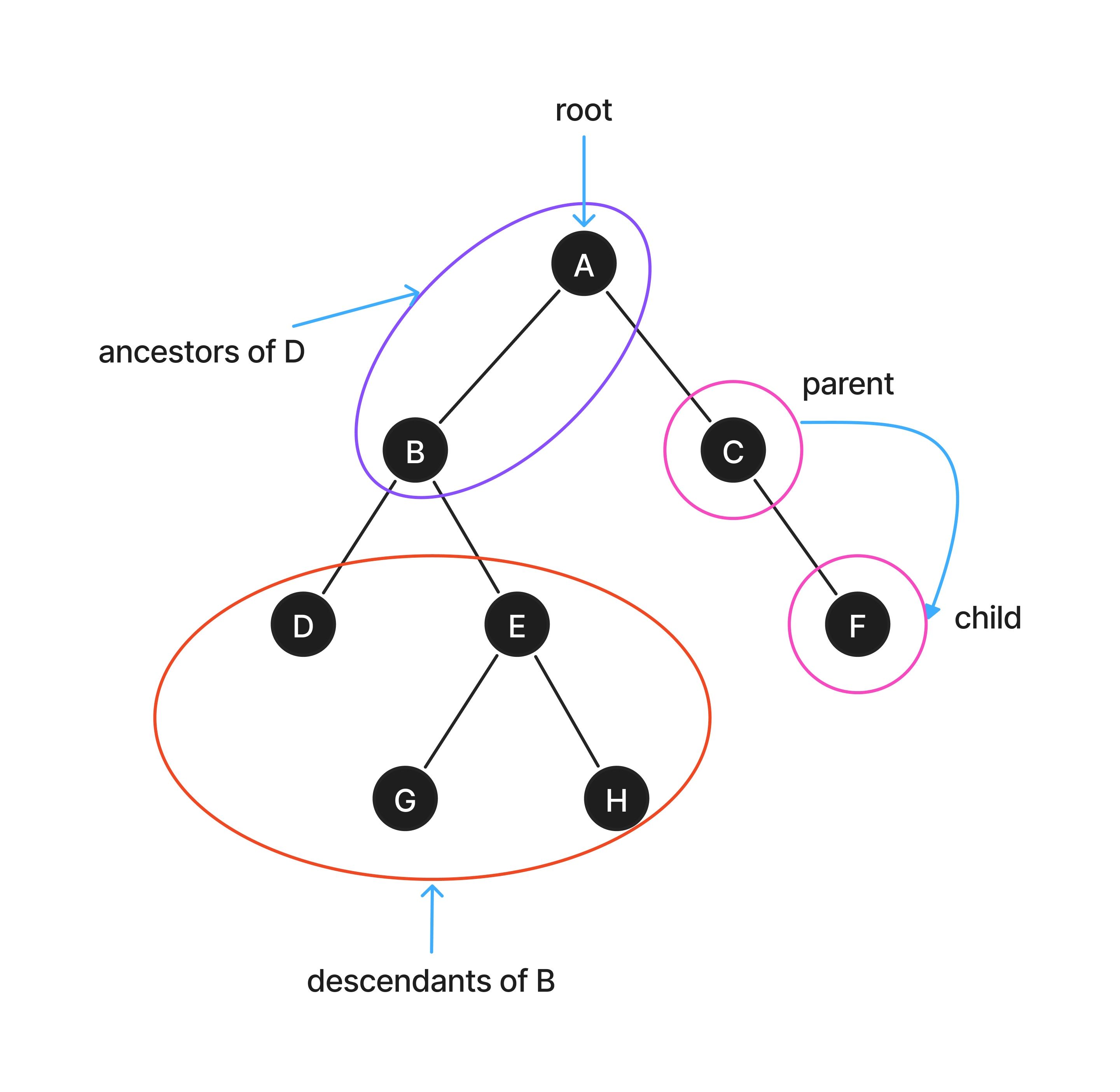
The idea here is that each node distributes the values to its descendants in an orderly manner. This will provide us an efficient way of navigating from the root to the leaf that contains the element, of which it’s key is closest to that we’re looking for.
What is a Binary Tree?
A binary tree is a form of a tree data structure, in which each node has at most two children, referred to as the left child and the right child.
A node in a binary tree has the following properties:
- Depth - The depth of a node in a binary tree is the number of edges in the unique path from the root node to that specific node.
- Height - The height of a node in a tree is defined as the number of edges on the longest downward path from that specific node to a leaf node.
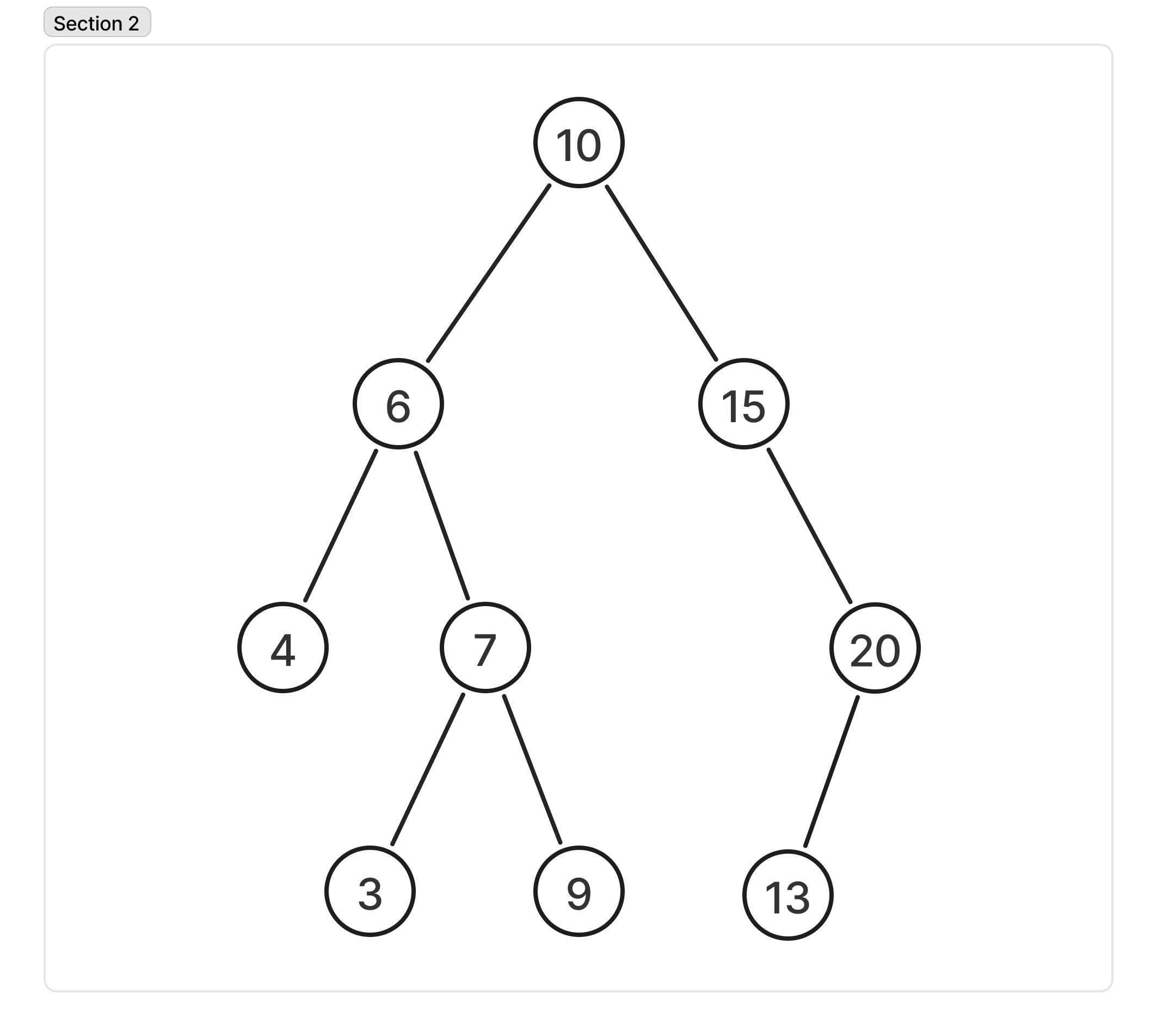
A formal recursive definition of a binary tree (BT) is as follows:
- Base case: an empty tree (often represented as
nullor NIL) is a binary tree. - Recursive step:
- A root node holding some data.
- A left subtree, which is itself a binary tree.
- A right subtree, which is also a binary tree.
How do binary trees help us?
If we look at the relationship between the height of the tree and number of nodes, we can see that adding a full level doubles the number of leaves in the tree, but allows us to reach from the root to each node with a cost of at most an extra single step.
In other words, a binary tree in which all levels are full, there are $O(\log (n))$ levels, where $n$ is the number of nodes in the tree.
Binary Search Tree
In a Binary Search Tree (BST), each node can have at most two children (left and right) and must satisfy a specific ordering property.
Key properties
For any given node in a BST:
- All values in its left subtree must be smaller than the node’s own value.
- All values in its right subtree must be greater than the node’s own value.
- Both left and right subtrees must also be binary search trees themselves.
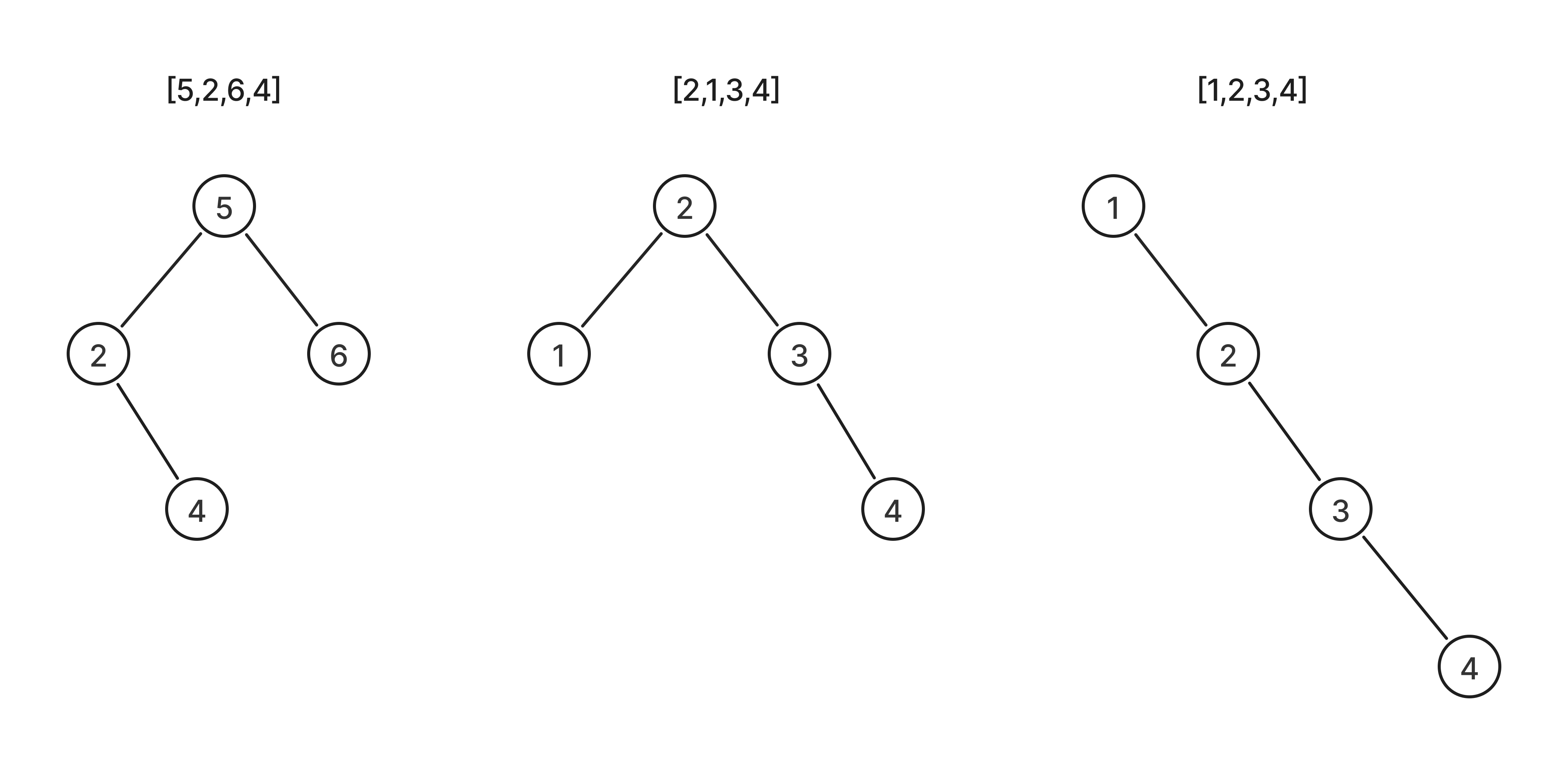
Basic operations on a Binary Search Tree
- Search: This operation finds a specific key within the tree.
- Insertion: This operation adds a new node to the tree while maintaining the BST property (left child values are smaller, right child values are larger).
- Deletion: This is the most complex operation, involving removing a node and reorganizing the tree to maintain its properties.
Searching in a Binary Search Tree
To search for a specific value in a binary search tree (BST), you can use an efficient algorithm that takes advantage of the tree’s ordered structure.
The process is as follows:
- Start at the root node.
- Compare the target value you are searching for with the value of the current node.
- Determine the next step based on the comparison:
- If the target value equals the current node’s value, the search is successful, and you can return the node.
- If the target is less than the current node’s value, you know the value is in the left subtree, so you move to the search in the left child.
- If the target is greater than the current node’s value, you know the value must be in the right subtree, so you move the search to the right child.
- Repeat the comparison and traversal process until one of the two conditions is met:
- The target value is found.
- You reach a
NULL(or empty) node, which means the target value is not present in the tree.
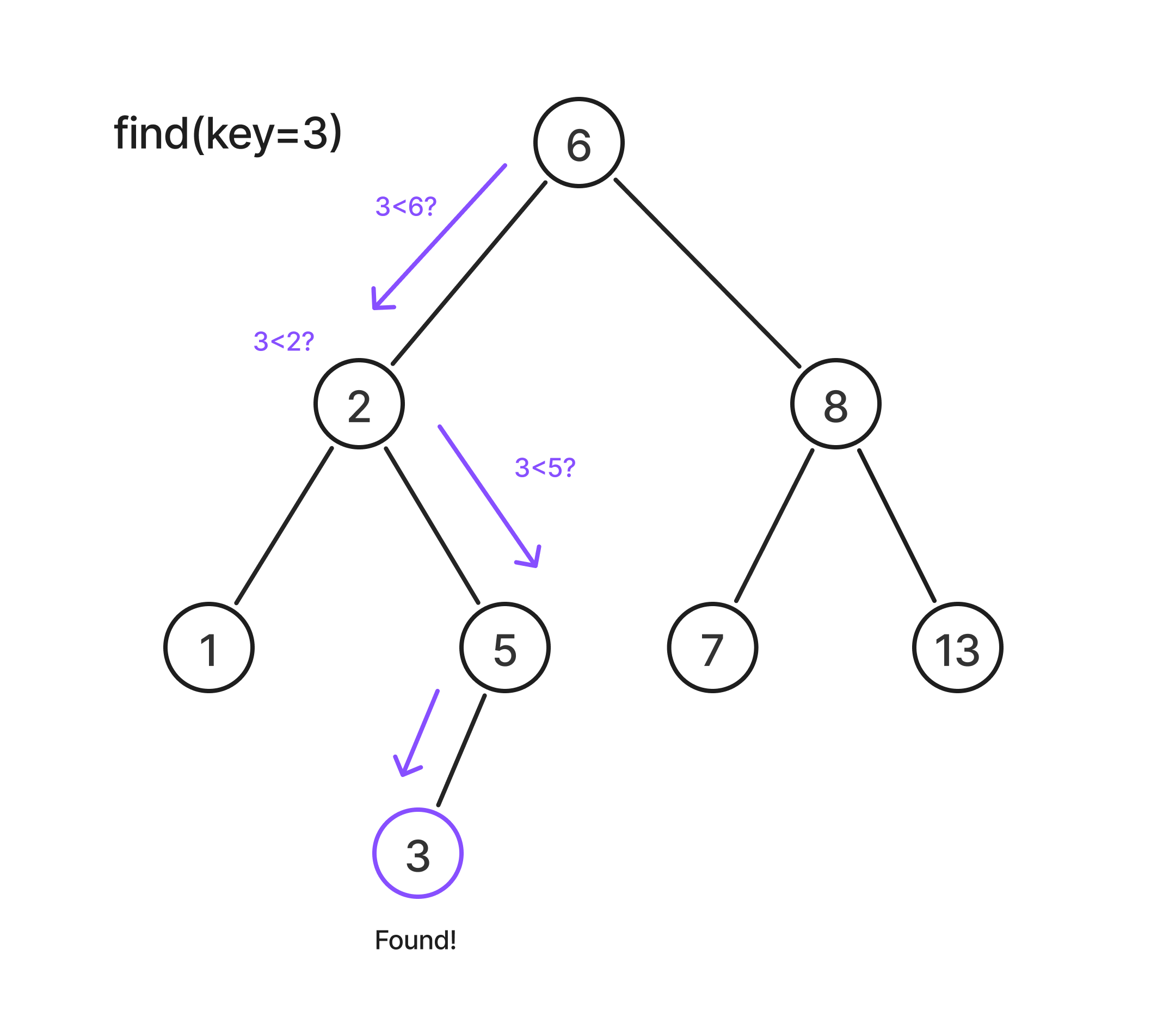
Searching a BST in Ruby:
def tree_search(node, key)
  while node != nil && key != node.key
    if key < node.key
      node = node.left
    else
      node = node.right
    end
  end

  node
end
Insertion in a Binary Search Tree
Inserting a new value to a binary search tree, is quite similar to that of searching.
The process is as follows:
- Start at the root node:
- If the tree empty, the new value becomes the root node.
- Compare the value to insert with the current node:
- If the value is less than than the current node’s value, move to the left child.
- If the value is greater than than the current node’s value, move to the right child.
- Repeat the comparison by moving left or right until you reach a
NULLchild position. - Insert the new node:
- Insert the new value at that null position as a leaf node
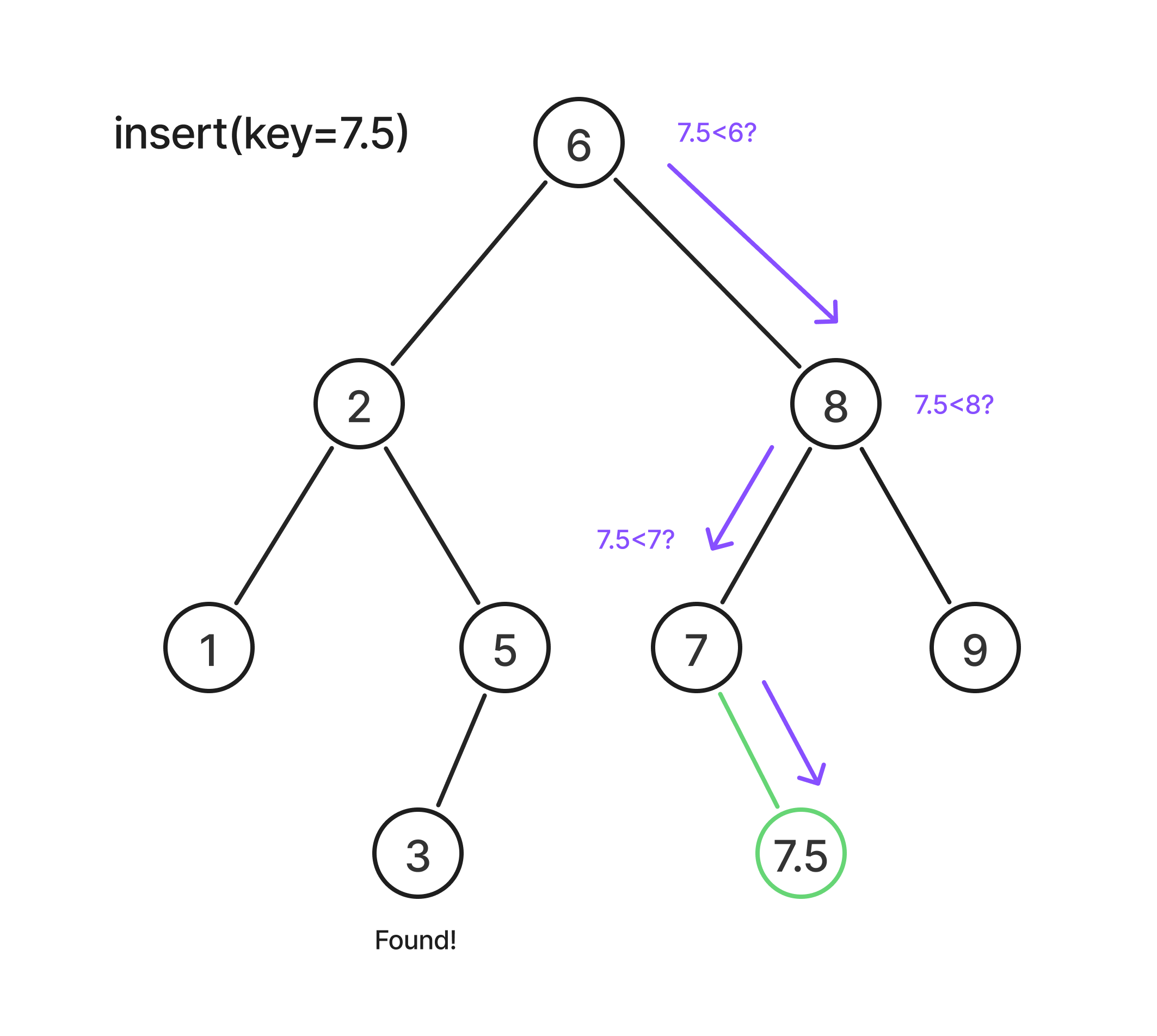
Inserting a value into a BST in ruby:
def insert(node, key)
  return Node.new(key) if node.nil?

  if key < node.value
    node.left = insert(node.left, key)
  elsif key > node.value
    node.right = insert(node.right, key)
  end

  node
end
Deletion in a Binary Search Tree
Deletion in a BST is a bit more nuanced than insertion because you have to maintain the BST property after removing a node.
Cases for deletion
When you want to delete a node with a given value, there are three main cases:
- Node is a leaf (no children):
- Simply remove the node.
- No further adjustments needed.
- Node has one child:
- Replace the node with its child.
- Keeps the BST intact.
- Node has two children (the trickiest case):
- Replace the node with either:
- Inorder successor - the smallest node in the right subtree.
- Inorder predecesor - the largest node in the left subtree.
- Then delete the successor/predecessor (which will now fall into case 1 or 2).
- Replace the node with either: